


Speeding up page load times with a query cache

Preamble
A quick aside by way of introduction: in French, I insist that cache is feminine, a hiding place where you stash data for later use, and I enjoy defending that against un cache, du cache, une log and une bûche alike.
In English, at least, nobody argues about the gender of a cache. Closing bracket.
Scope of this article
This article is a technical tutorial for production managers and engineers, as well as developers of RESTful applications based on SQL queries. It describes a paradigm that could reduce the time taken to build a recordset (= resulting data set) for a query. It’s particularly suited to systems with high data inertia, i.e. where data changes infrequently, and where queries are often identical, especially when coming from several clients at once. It’s particularly well suited to CMSs and to systems based on daily overnight imports that mainly use this data during the following working day.
QueryCache is just one brick in the Quality wall
Seeking to speed up query execution, or more precisely to speed up building a recordset, only makes sense as part of the broader pursuit of quality for your application.
User Responsiveness (UR) is a function of several variables. One of them, as I said, is the speed at which a query is processed. Which in turn depends on how well that query is optimised, i.e. the appropriate use of indexes and of SQL grammar, making the most of factorisation where applicable. The principle of factorisation is to replace n queries WHERE primary_key = a_variable_value with a single query applied to the set of all possible values of “a_variable_value”. You go from n queries to just one. Obviously this comes with loop processing afterwards.
Among the other variables of the performance function, let’s mention in particular CPU performance, RAM capacity, and therefore the ability not to use swap, or worse, disk cache. Among UR factors, on the front-end side this time, you’ll also find ergonomics, composing the rich interface client side as much as possible, and using content delivery networks (CDN) geographically close to the end user. All these variables need to be studied then optimised, so that the overall user experience (UX) quality improves.
How is it different from the MySQL cache?

At first glance, QueryCache is therefore unsuitable, since it could return stale recordsets. In reality, it is likely to be better suited, but to situations different from the former. Indeed, its behaviour isn’t random but fully controlled by the project owner. Whatever the activity of other users, it will necessarily be active wherever the implementer wants it. Like an antibody, it will only act on certain SELECT queries and not all of them, with a controlled lifetime for cached data. It’s particularly well suited to systems where “slightly” stale data does the job perfectly well. This point is very important: QueryCache will not test the freshness of the source data, i.e. in the tables the cached queries rely on, but only the expiry date of the data sets stored in this cache. So please use QueryCache with the greatest discernment, depending on the inertia of your data, your users’ needs, and the trade-off between freshness and performance.
This article also has a teaching role, since it shows how to set up a data cache indexed by a hash. This system is worth knowing, as it’s akin to a design pattern, even though it doesn’t appear as such in the list of well-known design patterns established by the Gang of Four.
QueryCache, a caching system that speeds up targeted SELECT queries

If you use MySQL, you can rely on the notion of slow queries, and on MySQL’s ability to log them, to draw up a shortlist of candidates for “QueryCaching”. As a bonus, you’ll find alongside the principle diagram of a system that prepares this shortlisting work. With a suitable epsilon, after a few hours or days of work, the cache should fill up with the SQL texts of the queries “caught” this way. All that’s left is to implement QueryCache on these queries, case by case.
In my home-made framework, I developed an abstraction layer over the standard php-mysql library. For example, mysql_query became db_query. The latter calls mysql_query after a number of operations: parsing, logging, sending an alert email on error, etc. In short, this function is fairly complex, as it sits at the heart of the quality assurance and service continuity system. In particular, it uses a slow query tracking system finer than the native slow query system. Taking inspiration from my idea, you can set up your own system, and in particular add to the QueryCache cache, for later automatic processing, any query slower than epsilon seconds.
To register a query in the cache with its recordset, use the QueryCache::ExecuteAndStoreQuery method.
To register a query in the cache without its recordset, add a Store method to QueryCache yourself, inspired by ExecuteAndStoreQuery! That’ll be good practice for you!
Detailed relational diagram of how the system works
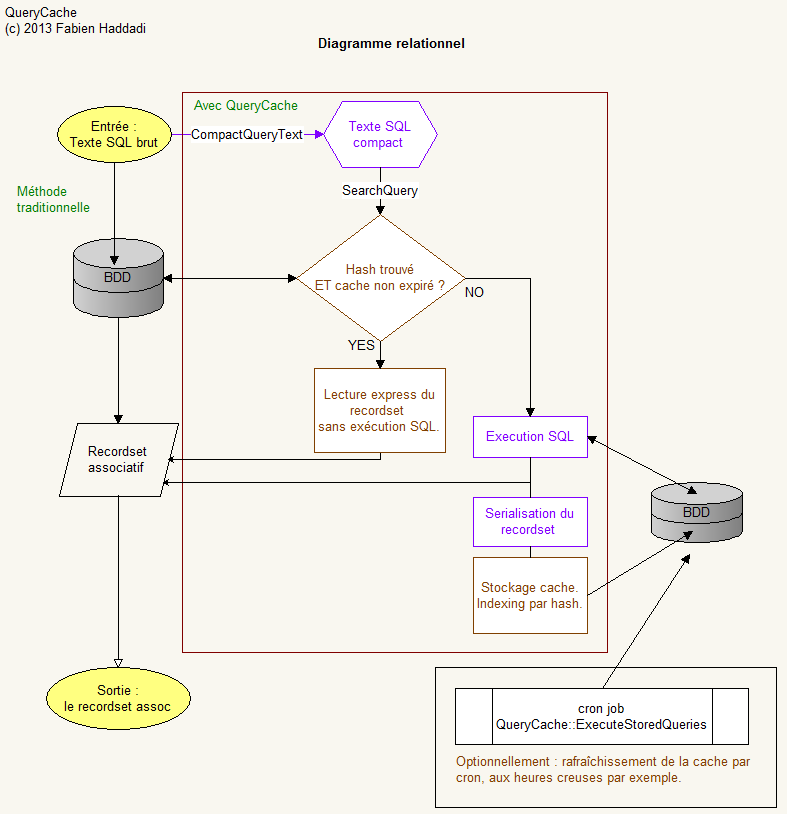
num_rows isn’t used for discrimination within the class, but could perfectly well be used to present the data on the front-end.
Implementing QueryCache in PHP
Technically, QueryCache could be written in any language. Since it’s my specialty, I wrote it in PHP for MySQL.
<?php

require "/path/to/my_standard_libs.inc"; // Ici vos inclusions standards


// Vous trouverez le package QueryCache en téléchargement en bas de cette article.

use Vendor\Tropicalm\Utils\QueryCache as QueryCache;


/*****************************************************************************/


// Exemple d'utilisation de l'API QueryCache


// Initialiser le chronomètre

$_t0 = microtime(true);


// Une grosse requête arrive...

$sql = file_get_contents("C:/Users/mylogin/QueryCacheTest/slow.sql");


/* Récupérer l'instance QueryCache (Singleton)

Notez l'utilisation du namespace Vendor\Tropicalm\Utils\QueryCache.

Si vous utilisez une version de PHP trop ancienne pour les namespaces,

passez-vous des préfixes QueryCache\

*/

$Query = QueryCache\QueryFactory::Create($sql, $lifetime = 900); // On lui donne 15' de durée de vie

$QueryCache = QueryCache\QueryCache::getInstance('mydatabasename');


// Fait-elle partie des requêtes cachées ?

// Si oui, récupérer son recordset directement dans la cache

if ($QueryCache->SearchQuery($Query)) {

   /* FirePHP est mon implémentation personnelle de la classe FirePHP.

  Elle loggue dans un fichier, ou en sortie standard, ou tout simplement en console FireBug.

  Remplacez-la par un appel FirePHP standard, ou bien par echo, ou par n'importe quel logger de votre choix.

  */

   FirePHP("Requête trouvée dans la cache. Dernière exécution le " . $Query->LastExecuted) .

  ". Expirera le " . date('d-m-Y H:i:s', strtotime($Query->LastExecuted) + $Query->ExpiresIn);

}

else {

   FirePHP("Pas trouvé dans la cache, j'exécute la requête tout de suite pour la servir

et je la stocke avec une durée de vie de 600 secondes");

   $QueryCache->ExecuteAndStoreQuery($Query, $lifetime = 600);

   FirePHP(sprintf("Operation time %.3f s", microtime_float()-$_t0));

}


foreach($Query->Recordset as $index => $data) {

 /*

 Utilisez ici le tableau associatif $data dans votre code legacy,

 tel que vous l'auriez écrit dans une boucle while($row = mysql_fetch_assoc($result)) {

   // actions

 }

 */


}

?>
Another example: refreshing cache entries when a source table is modified
Suppose the freshness of your cache is defined solely by the freshness of another table, called the source table here. Suppose you’ve already been using your web application for a few hours, and a human or a process modifies some data in the source table. You know your cache is now stale. Finally, suppose the cache holds several variants of the same query, depending on whether you invoked it with particular ORDER BY clauses, for example. Ideally, you’d want to refresh the entries concerned automatically, rather than wait for the automatic refresh, right? The built-in QueryCache::RefreshStoredQueriesByRegExp() method can give you a suitable solution. Let’s see this with an example.
<?php

require "/path/to/my_standard_libs.inc";


// instruire d'utiliser le package QueryCache

use Vendor\Tropicalm\Utils\QueryCache as QueryCache;


// Soit l'élément déclencheur suivant :

$sql = "UPDATE `table_source` SET `quantite_recue` = 10 WHERE `sku` = 395822";

db_query($sql);


/**

Alors plusieurs entrées de la cache sont susceptibles d'avoir été màj.

Il vous suffit d'appeler la méthode suivante pour rafraîchir toutes les entrées concernées en une seule ligne,

 et leur donner une journée de vie.

*/

$QueryCache->RefreshStoredQueriesByRegExp('^SELECT `table_source`\.\*');

/** Attention, l'expression régulière passée en argument doit correspondre au texte compacté de la requête effectivement utilisée dans votre code. */

?>
Implementation on the business tier
On the business tier, it’s a system to install on your application through a class to include in the PHP scripts (download at the bottom of this page) that will use the system. A unit implementation, case by case, on each candidate query, will then be easy. See the example in the download at the end of the article.Implementation on the data tier
On the data tier, you’ll need to add a table whose schema is given below:Careful: the size of the query_hash field must match the hash length of the algorithm used. Here sha1.
CREATE TABLE IF NOT EXISTS `query_cache` (

  `query_hash` char(40) NOT NULL,

  `query_text_compact` text NOT NULL,

  `recordset` mediumblob,

  `num_rows` mediumint(8) unsigned DEFAULT NULL,

  `creation_date` datetime NOT NULL,

  `execution_date` datetime DEFAULT NULL,

  `execution_time` decimal(6,3) unsigned DEFAULT NULL,

  `expires_in` int(10) unsigned NOT NULL DEFAULT '21600',

  `last_used_date` timestamp NOT NULL DEFAULT CURRENT_TIMESTAMP ON UPDATE CURRENT_TIMESTAMP,

  PRIMARY KEY (`query_hash`),

  KEY `last_used_date` (`last_used_date`)

) ENGINE=InnoDB DEFAULT CHARSET=utf8;
Download the Vendor\Tropicalm\Utils\QueryCache package
Usage: unzip it and place it on your include_path.
dwnl://Vendor_Tropicalm_Utils_QueryCache.zip:Download QueryCache:
This class actually contains three: QueryFactory, Query and QueryCache.
QueryFactory builds Query objects.
Query is a query object, to instantiate as many times as you like.
QueryCache is the cache system’s single object. You get it as a Singleton.
Management crons
Here’s an example of a cron refreshing the cached queries, preceded by a purge of queries unused for more than a month.
<?php

use Vendor\Tropicalm\Utils\QueryCache As QueryCache;


$QueryCache = QueryCache\QueryCache::getInstance('my_database_name');

$QueryCache->FlushOlderQueries(32);    // 32 jours recommandés

$QueryCache->RefreshStoredQueries();
Improvements made, post scriptum
Since this article was first written, time has passed, and the software I implemented this cache on has used it generously. The cache became so popular that some stored recordsets are huge, and led to saturating the memory allocated to PHP scripts. As a reminder, the latter is defined by the memory_limit directive in php.ini, readable with the PHP statement:
echo ini_get('memory_limit');
To avoid the trap of giving every PHP script on the server a large amount of memory “to be safe”, I prefer to add memory reallocation smarts inside the recordset-building loop. In the style of good old C realloc, here’s the patch I propose, currently giving satisfaction on the server I look after:
In the Execute method, replace
<?php

[...]


while($_row = db_fetch_assoc($_result)) {

    $this->Recordset []= $_row;

}


[...]

?>
with
<?php

[...]

while($_row = db_fetch_assoc($_result)) {

    $this->Recordset []= $_row;

    /* In case memory gets exhausted (memory_limit - REALLOC_INCREMENT lignes), reallocate some. */

    ReallocArithmeticIfExhaustion(self::REALLOC_INCREMENT*strlen(implode('', $_row)));

}


[...]

?>
Here’s the implementation of the ReallocArithmeticIfExhaustion utility function; I put it in a library shared across the project.
<?php

[...]

// Add $Incr bytes to current memory allocation in an arithmetic series (vs geometric series) if the current memory usage is exceeds limit - $Incr

function ReallocArithmeticIfExhaustion($Incr = 1048576) {

    $MemoryLimit = IniGetMemoryLimitInt();

    // printf("ReallocArithmeticIfExhaustion($Incr) : current memory_limit=%dB, base usage=%d kB\n", $MemoryLimit, memory_get_usage() / 1024);


    if (memory_get_usage() > $MemoryLimit - $Incr) {

        printf("Attempting to realloc up to %f MB...", ($MemoryLimit + $Incr) / 1024 / 1024);

        if (ini_set('memory_limit', $MemoryLimit + $Incr)) {

            $MemoryLimit *= 2;

            // print "SUCCESS.\n";

            return true;

        }

        else {

            // print "FAILED.\n";

            return false;

        }

    }

    else {

        // print "It's ok, we've got some room left.\n";

    }

    return 0;

}


[...]

?>
Possible improvements
Add a method that only writes the text of the queries passing through your database wrapper, without triggering their execution at first. The execution_time field needs filling in. After a few days of use, sorting by descending execution_time will reveal the queries to put the spotlight on.